

Introduction (BeenVerified & TruePeopleSearch)
Your personal information is likely sitting on data broker sites like BeenVerified and TruePeopleSearch. These platforms collect and sell your address, phone number, email, and even criminal records. In 2026, this data is more accessible than ever. But you can remove yourself. This guide walks through the exact steps to opt out of both platforms. We cover why your data reappears, how to monitor for new listings, and what to do if a site ignores your request. By the end, you will have a clear plan to reclaim your privacy.
Also read: What is Telegram Used For?
Why BeenVerified and TruePeopleSearch Still Expose Your Personal Data in 2026
These sites aggregate public records, social media data, and information from third-party sources. They make money by selling access to your profile. Even after you opt out, your data can reappear if a new source publishes the same information. This is called zombie data. Understanding this cycle is the first step to permanent removal.
Understanding How These Sites Collect and Sell Your Information
Data brokers pull information from court records, property records, voter registration, social media, and marketing databases. They cross-reference these sources to build detailed profiles. They then sell subscriptions to employers, landlords, and private investigators.
Step 1: Gather All Your Personal Details Before Starting the Removal Process
Before submitting opt-out requests, collect your full name, current and past addresses, phone numbers, email addresses, and any aliases you have used. This ensures you can identify every profile associated with your identity.
Step 2: Create Accounts on Both Platforms to Locate Your Profiles
You need to create a free account on BeenVerified and TruePeopleSearch to search for yourself. Use a temporary email address if you prefer. Write down the exact URLs of your profile pages. You will need these for the opt-out process.
Step 3: Submitting Official Opt-Out Requests on BeenVerified
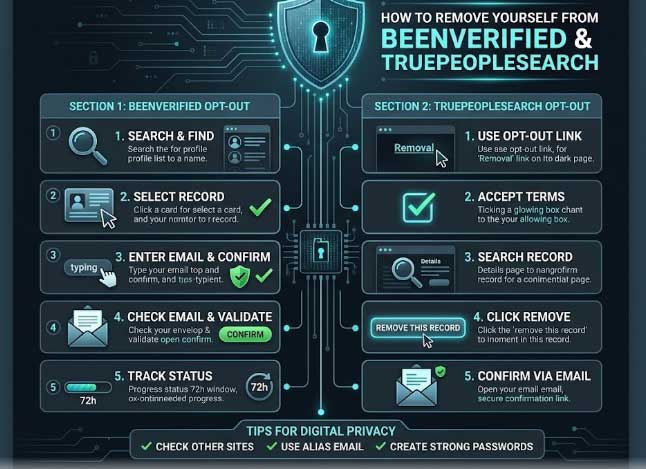
Go to BeenVerified’s opt-out page. Enter the URL of your profile. Provide your email address. They will send a confirmation link. Click the link to complete the removal. The profile is typically removed within 24 to 48 hours.
Step 4: Submitting Opt-Out Requests on TruePeopleSearch on BeenVerified & TruePeopleSearch
TruePeopleSearch offers a similar process. Visit their opt-out page. Search for your listing. Click the opt-out button next to your profile. Confirm your email address. The removal usually takes effect within a few hours.
How Long Does Each Removal Request Usually Take?
BeenVerified typically removes profiles within 24 to 48 hours. TruePeopleSearch often processes removals within a few hours. However, your data may reappear if new records are added from other sources. BeenVerified & TruePeopleSearch.
Common Mistakes That Cause Your Data to Reappear
- Not opting out of all associated profiles.
- Using inconsistent name formats.
- Ignoring family member listings.
- Not checking back after a few months.
- Failing to block new data sources.
Using Removal Services vs. Doing It Yourself: Pros and Cons (BeenVerified & TruePeopleSearch)
Removal services like DeleteMe and Kanary can handle multiple sites for a monthly fee. Doing it yourself saves money but requires ongoing effort. For most people, a combination works best: do the initial removals yourself and use a service for monitoring.
Step 5: Monitor Your Information Across Multiple People Search Sites
After removing yourself from BeenVerified and TruePeopleSearch, check other sites like Spokeo, Whitepages, and Radaris. Use a monitoring tool or set up manual checks every few months.
How to Handle Family Member Data That Appears Alongside Yours
If your relatives appear in your search results, their profiles may also need removal. Ask for their permission and help them opt out. Some data broker sites allow you to request removal on behalf of others.
Step 6: Set Up Google Alerts for Future Data Leaks
Create Google Alerts for your full name, email address, and phone number. You will receive notifications when new information about you appears online. This helps you catch new listings early.
Legal Rights and Limitations When Dealing With Data Brokers (BeenVerified & TruePeopleSearch)
In the US, data brokers are regulated by state laws. Some states like California and Virginia give residents the right to opt out of data sales. Check your local laws. Internationally, GDPR provides stronger protections for EU residents.
Step 7: Strengthen Your Overall Digital Privacy After Removal
After removing your data, reduce future exposure. Use a VPN like Worlddumps.site to hide your IP address. Use encrypted email and messaging. Limit what you share on social media.
Using VPNs and Privacy Tools to Prevent Future Exposure
A VPN encrypts your traffic and hides your IP. This makes it harder for data brokers to link your online activity to your identity. Worlddumps.site offers SOCKS5 bundles and anti-detect profiles that add extra layers of privacy.
Step 8: Regularly Check and Re-Opt-Out Every Few Months (BeenVerified & TruePeopleSearch)
Data broker sites add new data continuously. Set a reminder to check your profiles every three months. Re-submit opt-out requests if your data reappears.
What to Do If a Site Ignores or Delays Your Removal Request
If a site does not process your opt-out, file a complaint with the FTC or your state attorney general. Some states have specific laws that require data brokers to honor opt-out requests within a certain timeframe.
Step 9: Protect Your Address, Phone, and Email From New Listings (BeenVerified & TruePeopleSearch)
Use a PO box for mail. Use a virtual phone number for online forms. Create separate email addresses for different purposes. This limits how much new data can be collected.
Step 10: Build a Long-Term Privacy Checklist That Includes These Sites
Create a document that lists all the data broker sites you have removed yourself from. Include the dates and any confirmation numbers. Update this list every quarter.
Also read: The Ultimate Digital Privacy Checklist
Common Mistakes Beginners Make on BeenVerified & TruePeopleSearch
- Not gathering all personal details first.
- Forgetting to confirm the opt-out email.
- Ignoring family member data.
- Not checking back after removal.
- Using a real email address for the opt-out.
Pro Tips for Successful Data Removal on BeenVerified & TruePeopleSearch
- Use a dedicated email address for opt-out requests.
- Take screenshots of your profile before removal.
- Keep a log of all opt-out submissions.
- Use a VPN when accessing data broker sites.
- Set a calendar reminder for quarterly checks.
Expert Insights on Data Broker Privacy
Privacy experts recommend a proactive approach. Remove your data, then prevent new data from being collected. Combining opt-outs with privacy tools like VPNs and encrypted communication is the most effective strategy.
Real World Applications on BeenVerified & TruePeopleSearch
This process is used by individuals who want to protect their personal information from employers, landlords, and identity thieves.
Actionable Takeaways on BeenVerified & TruePeopleSearch
- Start with BeenVerified and TruePeopleSearch.
- Gather your details first.
- Submit opt-out requests.
- Monitor for reappearance.
- Use a VPN for ongoing protection.
Summary of BeenVerified & TruePeopleSearch
Removing yourself from BeenVerified and TruePeopleSearch is possible with a systematic approach. Gather your details, submit opt-out requests, and monitor for reappearance. Combine this with privacy tools for lasting protection.
Conclusion of BeenVerified & TruePeopleSearch
Your personal data is valuable. Take control by removing it from data broker sites and preventing future exposure.
Call to Action: Visit Worlddumps.site to get Non VBV BINs or clonecards.store to get clone cards, legit dumps with pin and carding materials. Also visit cvvdump.uno to get money swift money transfer service which includes bank transfer, PayPal, CashApp, Venmo, Zelle, and Western Union transfers.
Also read: How to Stop Unwanted Calls
FAQ on BeenVerified & TruePeopleSearch
How do I remove myself from BeenVerified?
Go to their opt-out page, enter your profile URL, confirm your email, and wait 24 to 48 hours.
How do I remove myself from TruePeopleSearch?
Visit their opt-out page, search for your listing, click opt-out, and confirm your email.
Why does my data reappear after removal?
Data brokers add new information from public records and other sources regularly.
How often should I check for new listings?
Every three months is recommended.
Can I remove family member data?
Yes, with their permission. Some sites allow you to request removal on behalf of others.
What if a site ignores my opt-out request?
File a complaint with the FTC or your state attorney general.
Do I need a removal service?
Not necessarily, but services can save time and monitor multiple sites.
What is zombie data?
Data that reappears after removal because a new source published the same information.
How do I prevent future data collection?
Use a VPN, limit social media sharing, and use separate email addresses for different purposes.
Is it legal to remove my own data?
Yes, you have the right to opt out of data broker sites.
