

Introduction (How to Spot a Fake Social Media Profile)
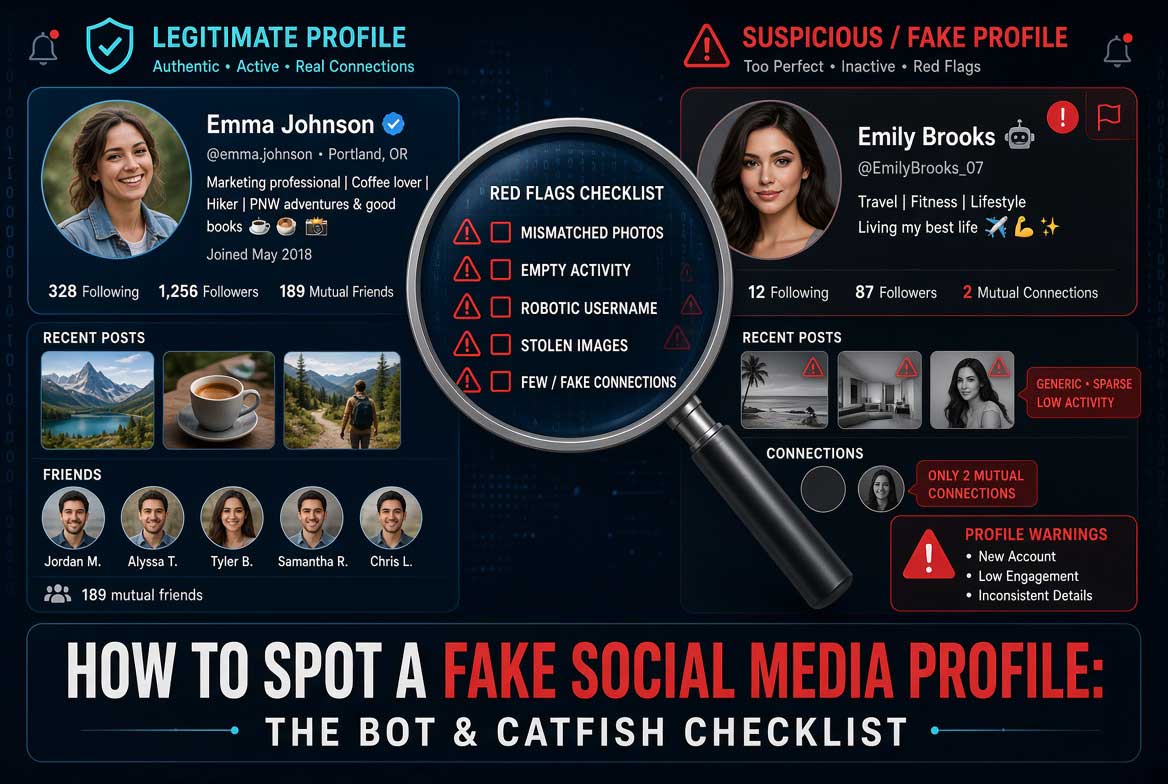
Fake social media profiles are everywhere. Bots, catfishes, and scammers create thousands of them every day. They look real. They post content. They interact with people. And they trick millions of users into trusting them.
Knowing how to spot a fake social media profile is essential for anyone who uses platforms like Facebook, Instagram, Twitter, LinkedIn, or TikTok. This guide gives you a complete checklist. You will learn the six key tests that security professionals use. You will understand the telltale signs of fake accounts. You will also discover advanced verification tools for serious investigations.
By the end of this guide, you will be able to identify fake profiles in under 60 seconds.
Also read: How to Find the Location of a Photo
The Perfect Photo Test (How to Spot a Fake Social Media Profile)
The first thing to check is the profile picture. Fake profiles often use images that look too perfect. These are usually AI-generated or stolen from stock photo websites.
Look at the face in the photo. Does it have the glazed skin texture common in AI images? Are there any anatomical errors in the hands, ears, or teeth? Zoom in on the image. Count the fingers. Check if the ears look natural. Real profile pictures have imperfections. Fake ones look airbrushed and flawless.
Also check if the photo appears on other profiles. Right-click the image and use Google Reverse Image Search. If the same face appears under different names, it is almost certainly a fake profile.
Another clue is the photo quality. Real people post a variety of images. They have photos from different angles, different lighting conditions, and different locations. Fake profiles often have only one or two high-quality photos that look professionally taken. Real people have candid shots, group photos, and pictures taken in everyday settings.
The Generic Username Test (How to Spot a Fake Social Media Profile)
Fake profiles use predictable username patterns. Look for these red flags:
Usernames that combine a common first name with random numbers, like john1987 or sarah_2023. Real people choose usernames that have personal meaning. Bots use generic patterns.
Usernames with excessive underscores or periods, like emma_williams_1985 or mike_johnson_1990. These patterns are common in automatically generated accounts.
Usernames that match the display name exactly. Real people often have usernames that differ from their display name. Bots keep them identical for simplicity.
Usernames that include the platform name, like InstagramUser1234 or TwitterFan2024. Real people do not name themselves after the platform they are using.
The Zombie Timeline Test (How to Spot a Fake Social Media Profile)
The timeline of a fake profile tells a clear story. Look at the posting history.
Fake profiles often have what investigators call a zombie timeline. This means the account was inactive for months or years, then suddenly became active. Scammers buy old accounts with established histories to look legitimate. Check the gap between the first post and recent activity. If there is a long silence followed by sudden posting, be suspicious.
Also examine the content. Fake profiles post low-effort content. They share memes, repost popular quotes, or share links without original commentary. Real people post original thoughts, personal updates, and varied content.
Check the engagement. Fake profiles have few comments from real people. Their posts get likes from other suspicious accounts. If most engagement comes from accounts with similar naming patterns, you are looking at a bot network.
The Crypto Pivot Test (How to Spot a Fake Social Media Profile)
One of the most reliable indicators of a fake profile is the crypto pivot. This is when an account suddenly starts promoting cryptocurrency, investment schemes, or get-rich-quick opportunities.
The pattern is always the same. The account builds trust by posting normal content for a while. Then it pivots to crypto promotions. The posts become urgent. They promise massive returns. They use phrases like limited time offer or guaranteed profits.
Real people do not suddenly become crypto experts overnight. If an account that posted about cooking or travel for months starts pushing Bitcoin investments, it is a scam.
Also look for the crypto comment spam. Fake profiles leave comments on popular posts promoting crypto giveaways. The comments are generic. They say things like great post, check my profile for free Bitcoin or message me for trading signals.
The Link in Bio Trap Test (How to Spot a Fake Social Media Profile)
The link in bio trap is a common tactic used by fake profiles. The profile has a link in the bio that leads to a phishing site, a malware download, or a fake login page.
Check the link before clicking. Hover over it to see the actual URL. Does it match the claimed destination? Scammers use URLs that look legitimate but have slight misspellings. For example, faceb00k.com instead of facebook.com.
Also check if the profile has multiple links pointing to different domains. Legitimate users typically have one or two links. Scammers rotate links to avoid detection.
Look at the bio text itself. Fake profiles often have bios that are too generic. They say things like digital creator, entrepreneur, or investor without specifying what they actually do. Real people provide specific details about their profession, interests, or location.
The T.R.U.S.T. Test (How to Spot a Fake Social Media Profile)
Use this simple checklist to evaluate any social media profile:
T – Timeline Consistency: Check for gaps in posting history. Look for sudden changes in content type.
R – Real Photos: Verify profile pictures using reverse image search. Look for AI generation artifacts.
U – Username Patterns: Check for generic naming conventions. Look for excessive numbers or underscores.
S – Social Proof: Examine followers and friends. Are they real accounts? Do they interact genuinely?
T – Trust Signals: Check for verified badges, linked websites, and cross-platform presence.
If the profile fails three or more of these checks, it is almost certainly fake.
Common Mistakes When Spotting Fake Profiles (How to Spot a Fake Social Media Profile)
Many people make these errors when trying to identify fake accounts:
Mistake 1: Trusting profiles with many followers. Followers can be bought. A profile with 10,000 followers might have only 50 real people among them.
Mistake 2: Ignoring the join date. New accounts with high activity are suspicious. Real people build their presence over time.
Mistake 3: Assuming verified badges mean safety. Verified badges can be faked or obtained through scams. They are not a guarantee of authenticity.
Mistake 4: Not checking multiple platforms. Real people exist on multiple platforms. Fake profiles are usually limited to one.
Pro Tips from Digital Investigators (How to Spot a Fake Social Media Profile)
Experienced digital investigators use these advanced techniques:
Analyze posting frequency: Bots post at regular intervals. Real people post irregularly. If an account posts exactly three times per day every day, it is likely a bot.
Check the follower to following ratio: Fake profiles often follow thousands but have few followers. Real people have more balanced ratios.
Examine comment quality: Bots leave generic comments. Real people leave specific, contextual responses. Look for comments that are relevant to the post content.
Use professional verification tools: For serious investigations, use advanced tools from trusted sources. Cvvdump.com offers verification data bundles that security professionals use. Worlddumps.site provides anti-detection profiles for research purposes. Buyccfullz.site includes integrated checkers that can analyze account metadata.
Also read: 5 Free Alternatives to PimEyes
Real-World Applications of Profile Verification (How to Spot a Fake Social Media Profile)
Knowing how to spot fake social media profiles has practical applications:
Online Dating: Protect yourself from catfish scams. Verify that your match is a real person before meeting.
Business Networking: Avoid connecting with fake profiles that may try to scam your company.
Influencer Marketing: Verify that influencers have real followers before paying for promotions.
Security Investigations: Detect bot networks and coordinated inauthentic behavior.
Personal Safety: Protect your family from online predators who use fake profiles.
Actionable Takeaways on How to Spot a Fake Social Media Profile
- Always reverse image search profile pictures.
- Check for the crypto pivot in posting history.
- Examine username patterns for generic naming.
- Use the T.R.U.S.T. test for systematic evaluation.
- For professional verification, use advanced tools from trusted sources like Cvvdump.com, Worlddumps.site, and Buyccfullz.site.
Summary of How to Spot a Fake Social Media Profile
Spotting fake social media profiles requires a combination of visual inspection, timeline analysis, and technical verification. The perfect photo test, generic username test, zombie timeline test, crypto pivot test, link in bio trap test, and T.R.U.S.T. test provide a complete detection framework. As fake profiles become more sophisticated, staying updated on detection techniques is essential. Use the T.R.U.S.T. test for quick evaluation and rely on professional tools for serious verification work.
Conclusion of How to Spot a Fake Social Media Profile
Fake social media profiles are a growing threat. But by mastering the techniques in this guide, you can protect yourself from bots, catfishes, and scammers. Remember to check the photo, examine the username, analyze the timeline, watch for the crypto pivot, avoid the link in bio trap, and use the T.R.U.S.T. test. Stay vigilant and always verify before you trust.
Frequently Asked Questions on How to Spot a Fake Social Media Profile
How can you tell if a social media profile is fake?
Check the profile picture using reverse image search, examine the username for generic patterns, analyze the timeline for inconsistencies, watch for the crypto pivot, and use the T.R.U.S.T. test for systematic evaluation.
What is the perfect photo test for fake profiles?
The perfect photo test involves examining profile pictures for AI generation artifacts like glazed skin texture, anatomical errors in hands and ears, and using reverse image search to see if the photo appears on multiple profiles.
Why do fake profiles have generic usernames?
Fake profiles use generic usernames because they are automatically generated. Patterns like first name plus numbers or excessive underscores indicate bot-generated accounts.
What is the zombie timeline in fake profiles?
The zombie timeline refers to accounts that were inactive for months or years then suddenly became active. Scammers buy old accounts with established histories to look legitimate.
What is the crypto pivot in fake profiles?
The crypto pivot is when an account that posted normal content suddenly starts promoting cryptocurrency investments or get-rich-quick schemes. This is a common tactic used by scammers.
What tools can detect fake social media profiles?
Professional verification tools are available from Cvvdump.com, Worlddumps.site, and Buyccfullz.site. These resources provide advanced analysis capabilities for serious verification work.
How accurate is fake profile detection?
Detection accuracy varies. The techniques in this guide catch most fake profiles, but sophisticated operations may require professional tools for reliable verification.
Do fake profiles always have obvious signs?
Not always. Well-maintained fake profiles can be difficult to spot. However, careful inspection using the techniques in this guide will reveal most fake accounts.
Can you trust verified badges on social media?
No. Verified badges can be faked or obtained through scams. They are not a guarantee of authenticity. Always perform your own verification.
How many followers do fake profiles typically have?
Fake profiles can have anywhere from zero to millions of followers. Follower count alone is not a reliable indicator. Check the quality of engagement instead.

2 Comments
Pingback: Social Media OSINT: The Complete Guide to Digital Footprints
Pingback: How to Find Hidden Social Media Accounts for Enumeration